1. A pipeline that runs
A pipeline is JSON. It names nodes and says which node comes next. The work itself happens in stages: Python classes you write and register by name.
A stage
A stage does one thing. This one reads a ticket out of a JSON file:
import json
from pathlib import Path

from stageflow import BaseStage, register_stage

DATA = Path(__file__).parent / "data"


@register_stage("LoadTicketStage")
class LoadTicketStage(BaseStage):
    """
    description: "Takes a prepared ticket out of data/tickets.json"
    arguments:
      ticket_id:
        type: string
        optional: true
        description: "Ticket id (T-1001); empty — the first one in the file"
    outputs:
      text:
        type: string
        description: "The customer's message"
      subject:
        type: string
        description: "The subject line"
      customer_id:
        type: string
        description: "Who wrote it"
    """

    async def run(self):
        wanted = (self.get_arguments().get("ticket_id") or "").strip()
        tickets = json.loads((DATA / "tickets.json").read_text())["tickets"]
        ticket = next((t for t in tickets if t["id"] == wanted), tickets[0])
        self.set_outputs({
            "text": ticket["text"],
            "subject": ticket["subject"],
            "customer_id": ticket["customer_id"],
        })
Two things are worth noticing.
The docstring is not a comment, it is the stage's specification: what the stage accepts, what it returns, and what the editor should draw. The core parses it and uses it to check your pipeline before the run. See stage specification for everything it can hold.
get_arguments() returns what the node passed in, and set_outputs() returns
the result. The stage never touches pipeline variables directly; the node
decides which variable goes into which argument.
A pipeline
Three nodes: where to start, what to do, where to stop.
{
  "nodes": [
    {"id": "start", "type": "entry", "variables": {"ticket_id": "T-1001"}, "next": "load"},

    {"id": "load", "type": "stage", "stage": "LoadTicketStage",
     "arguments": {"vars": {"ticket_id": "ticket_id"}},
     "outputs": {"text": "text", "subject": "subject"},
     "next": "done"},

    {"id": "done", "type": "terminal", "result": {"status": "loaded"},
     "artifacts": ["subject", "text"]}
  ]
}
entry is where execution starts and where the first variables come from.
stage runs your stage. terminal ends the run: result is the answer,
artifacts lists the variables worth keeping.
In arguments.vars the key is the argument name and the value is the variable
to take it from. In outputs it is the other way round: the key is a field
the stage returned, the value is the variable to write it into.
Running it
import asyncio

from stageflow import Context, Pipeline, Session

pipeline = Pipeline.from_dict(data)
pipeline.validate()          # ids resolve, stages exist, arguments match

result = asyncio.run(Session(id="run-1", pipeline=pipeline,
                             context=Context(vars={})).run())

print(result.result)         # {'status': 'loaded'}
print(result.artifacts)      # {'subject': 'Charged twice for October', 'text': 'Hi! I see two …'}
validate() is worth calling early. It checks the graph against the stage
specifications, so a typo in an argument name is an error before anything
runs, not halfway through.
The same graph in the editor
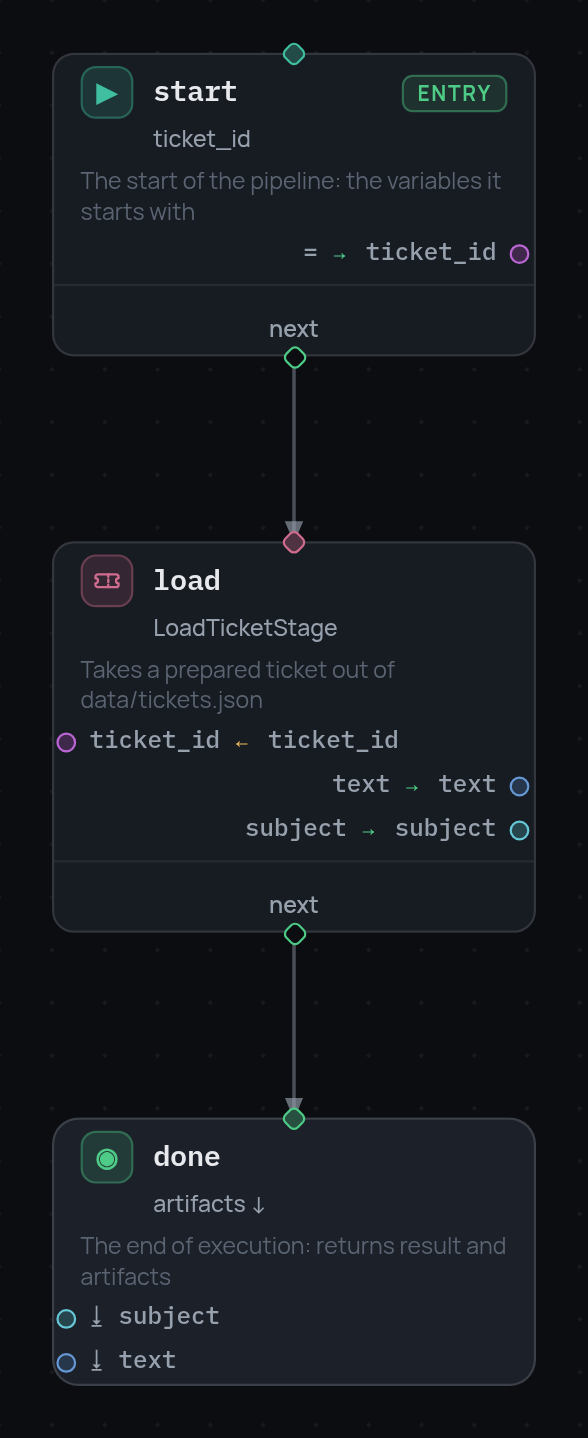
Each card shows the node from both sides. Above the divider is what it reads
(ticket_id ← ticket_id), below it is what it writes (text → text). The
arrow between cards is next.
Next: data between nodes.