6. A graph inside a node
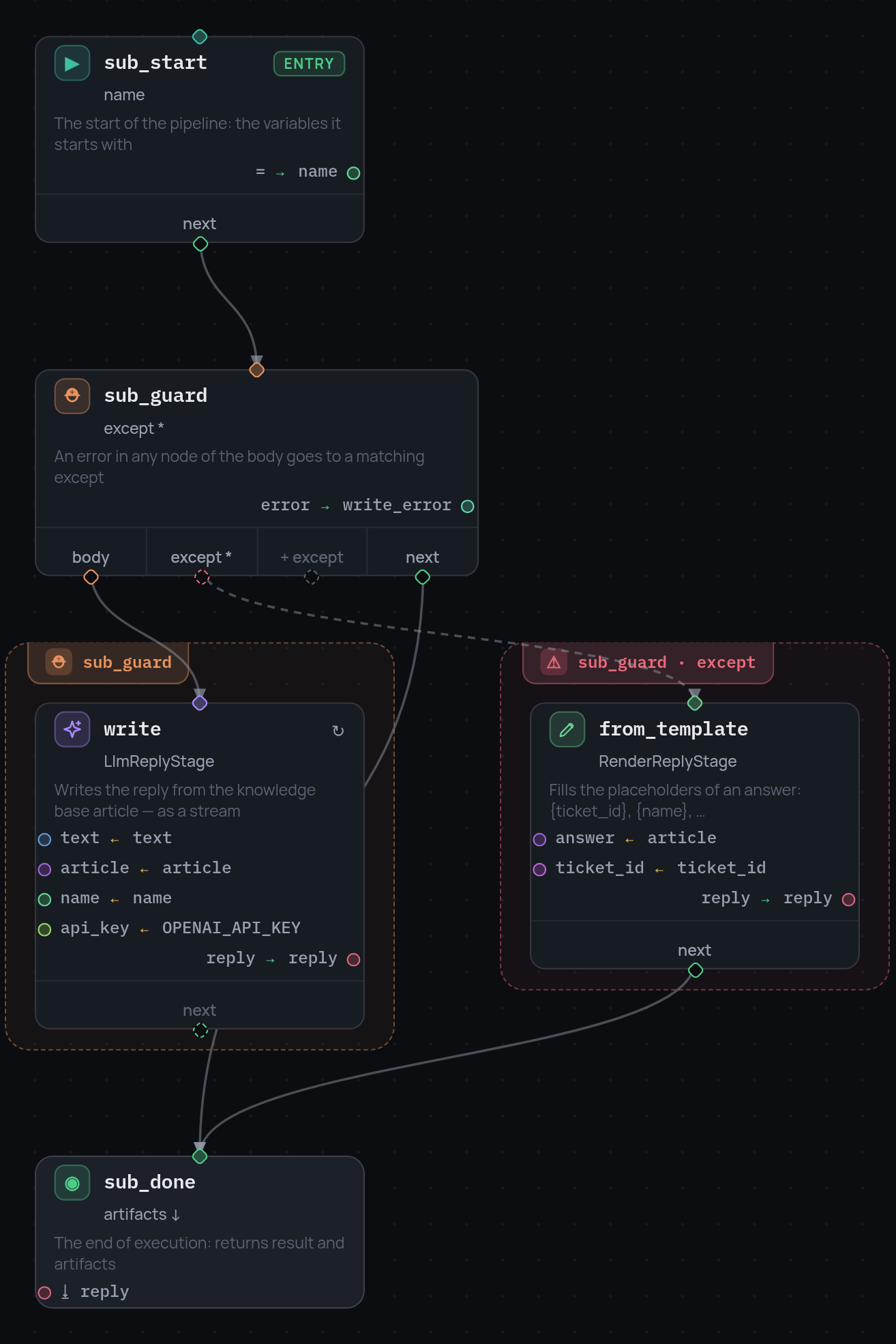
Writing the reply is a small job of its own: ask the model to write it, and if that fails, fill in the article template instead. It has its own try/except, its own steps, and nothing else in the bot needs to see them.
A subpipeline node holds that as a separate graph.
The node
{"id": "compose", "type": "subpipeline", "subpipeline_id": "compose_reply",
 "inputs": {"text": "text", "article": "answer",
            "name": "customer_name", "ticket_id": "ticket_id"},
 "artifact_outputs": {"reply": "reply"},
 "next": "send"}
The graphs live next to nodes, under subpipelines:
{
  "nodes": [ ... ],
  "subpipelines": {
    "compose_reply": {
      "nodes": [
        {"id": "sub_start", "type": "entry", "variables": {"name": "there"}, "next": "sub_guard"},
        {"id": "sub_guard", "type": "try", "body": "write", "next": "sub_done",
         "except": [{"error_equals": ["*"], "next": "from_template", "result_var": "write_error"}]},
        {"id": "write", "type": "stage", "stage": "LlmReplyStage", "...": "..."},
        {"id": "from_template", "type": "stage", "stage": "RenderReplyStage", "...": "..."},
        {"id": "sub_done", "type": "terminal", "artifacts": ["reply"]}
      ]
    }
  }
}
The frame is not shared
A subpipeline starts with a fresh frame. inputs is everything it gets: on
the left the name inside the child, on the right the variable in the parent.
Nothing else from the parent is visible.
That is the point of the node. The child cannot accidentally read or overwrite a parent variable, and you can reuse the same graph from several places without worrying about name collisions.
Results come back the same way round. artifact_outputs maps an artifact of
the child's terminal to a variable of the parent; result_output puts the
child's whole result into one variable.
Note
The example passes text, article, name and ticket_id into the
child. It does not pass OPENAI_API_KEY, so the model stage inside the
subpipeline has no key and always falls back to the template. Add the name
to inputs if you want the child to use the key as well.
In the editor
A subpipeline is a graph of its own, and the editor shows it as one. The dropdown next to "root graph" in the toolbar switches between the main graph and each subpipeline; "+ sub" creates a new one.
Next: watching it run.